
How to run an AI visibility audit on your Shopify store
Last reviewed
Short answer
An AI visibility audit checks two things: whether AI assistants can read your store, and whether they name it. For a Shopify store that means robots.txt access for retrieval bots, the Agentic channel settings, product data completeness, a small prompt set run on ChatGPT, Perplexity, Claude and Gemini, the competitors named instead, and AI referral traffic.
What the audit covers, and what it cannot tell you
Half of the audit is inputs: can the assistants fetch your pages, are your products flowing to their channels, and is the data good enough to match a real question. Those you can check exactly and fix the same day. The other half is outputs: when a shopper asks, are you named, who is named instead, and does any of it turn into visits. Those you can only sample.
What no audit gives you is a rank. AI answers are generated, vary between runs, and differ by user, so the output half produces a directional reading, not a precise score. Budget an hour for the first pass, with a spreadsheet open.
The checklist
Work top to bottom. The early rows gate the later ones: a blocked crawler or an excluded product makes the sampling results meaningless.
| Check | How | Pass looks like |
|---|---|---|
| Retrieval crawlers | Read yourstore.com/robots.txt | OAI-SearchBot, PerplexityBot, Claude-SearchBot and Claude-User not disallowed |
| Google-Extended | Same file | Not disallowed, unless you have decided to stay out of Gemini grounding |
| AI channels | Sales channels, then Agentic | ChatGPT and the other channels you want are active |
| Catalog coverage | Catalog product count on the Agentic page | Close to your count of active products |
| Product data | Ten best sellers, field by field | Specific title, real description, vendor, barcode where one exists, price above zero, image |
| Store policies | Settings, then Policies | Terms, privacy, and returns all filled in |
| Prompt sampling | 8 prompts on 4 engines, clean sessions | A scored sheet of 32 answers |
| Competitors | Tally names from the same sheet | You know the three names that keep coming up |
| AI traffic | GA4 AI Assistant channel and the Agentic analytics | A baseline number for sessions and orders |
Step 1: crawler access, 10 minutes
Open yourstore.com/robots.txt and read it as the bots do. The ones that matter for being named are the retrieval agents. OpenAI states sites opted out of OAI-SearchBot will not be shown in ChatGPT search answers. PerplexityBot is how Perplexity surfaces and links sites. Anthropic says blocking Claude-SearchBot can reduce your visibility in Claude's search results, and blocking Claude-User stops Claude fetching your pages when a user asks.
Gemini is the odd one. Google-Extended has no crawler of its own; it is a robots.txt token that controls whether Google may use your content to train Gemini and to ground answers in Gemini Apps. Google states it does not affect Google Search inclusion or ranking. Training bots such as GPTBot and ClaudeBot are a separate decision, weighed here.
On Shopify, changes go through a robots.txt.liquid template, which Shopify calls an unsupported customization. Shopify also notes older theme templates can output outdated rules, so check the live file even if you never edited it, and check any proxy in front of the store too.
Step 2: channel connections, 5 minutes
In Shopify admin, open Sales channels, then Agentic. Allow Shopify to manage for me is the default, and turning it off shows per-channel controls for Catalog access and direct checkout. Shopify's current channel list is ChatGPT, Google AI Mode and Gemini, Microsoft Copilot, Meta, and personal AI agents connected to Shop. ChatGPT also requires that your store sells to customers in the United States.
Then compare the Catalog product count on that page with your number of active products. A large gap means products are being excluded, and the requirements page lists why. Perplexity is not on Shopify's channel list, so it is a separate question, covered here.
Step 3: product data completeness, 15 minutes
Pick your ten best sellers and open each one. Shopify's Catalog guidance lists the fields it considers: title, description, images, type, vendor, collections, tags, barcode and variants. Every one is editable in your admin, and every one is what an assistant reads.
- Title: does it name the product type and the attributes a buyer filters on? OpenAI's feed spec asks for titles of at most 150 characters
- Description: is there real substance, or one line? The spec allows up to 5,000 characters
- Vendor and brand: a real brand name, not a placeholder
- Barcode: if the product has a GTIN, is it in the barcode field? Shopify sets the type to GTIN automatically for barcodes registered with GS1. If there is no GTIN, leave it empty; OpenAI's spec says not to invent one
- Category: Shopify Catalog excludes uncategorised products and classifies from your product information, so thin data risks a quiet exclusion
- Price above zero and at least one image, both required by Catalog
Step 4: prompt sampling across four engines, 20 minutes
Write eight prompts a buyer would type: three category questions (best X for Y), two with a constraint (X under $60, X that is dishwasher safe), two comparisons naming a competitor, and one with your brand name as a control. Run each once on ChatGPT, Perplexity, Claude and Gemini, which gives 32 answers.
Use clean sessions, because your own account knows you. In ChatGPT that means a temporary chat with the unpersonalised option: since August 2026 a personalised temporary chat can use your saved memories and custom instructions. For each answer, record in a sheet: engine, prompt, named yes or no, your site cited yes or no, every brand named, and anything said about you that is wrong.
Score it as named answers over total answers, per engine, with the denominator attached: 5 of 32, not 16%. One pass is a snapshot. Repeat the same prompts on a few separate days before reading much into it, as the manual method explains.
Here is what four rows of a finished sheet look like, for an illustrative store selling ceramic mugs. The pattern to look for is not the yes count; it is the reason column, because that is what you can act on.
| Engine | Prompt | Named? | Site cited? | Named instead | Likely reason |
|---|---|---|---|---|---|
| ChatGPT | best dishwasher safe coffee mug for the office | No | No | Two large mug brands | Dishwasher safe is not stated in the product title or description |
| Perplexity | best dishwasher safe coffee mug for the office | No | Yes, a blog post | Same two brands | Crawlable, but the product page lacks the attribute the prompt asks for |
| Claude | handmade ceramic mug under $40 | Yes | Yes | One other maker | Price, material and handmade are all in the product data |
| Gemini | your brand name, as a control | Yes | Yes | None | Brand queries work; category queries are the gap |
Step 5: competitor naming, 5 minutes
From the same sheet, count every brand and store named across the 32 answers. The three that recur most are your real competition in AI answers, which is often a different list from your search competitors.
Then look at what they have that you lack: more complete product data, more reviews, more third-party mentions. Data you can fix this week. Reputation is the slower half, and the difference between listed and recommended is where that is explained.
Step 6: referral traffic, 5 minutes
Since 13 May 2026, GA4 assigns the medium ai-assistant to referrals from recognised assistants such as ChatGPT, Gemini and Claude, and groups them in an AI Assistant channel. In Shopify, the Agentic page reports sales, orders, online store sessions and conversion per AI channel, though not yet for headless stores.
Write down this month's numbers as the baseline. Both undercount, because AI apps often strip the referrer and those visits land in Direct. The custom channel group that closes part of the gap is here.
What to re-check every month
Most of the audit does not change month to month. These parts do, and each takes a few minutes once the first pass is done.
- robots.txt, after any theme change, app install or CDN change
- The Agentic page: channel states and the Catalog product count
- Product data for anything added since last month
- The same eight prompts on the same four engines, unchanged, so the comparison holds
- AI channel sessions and orders against the baseline, read as a trend
The part you can hand off
Steps 1 to 3 are checks you do once and then glance at. Step 4 is the one that wears thin, because it has to be repeated to mean anything. The free check automates a first pass of it: it writes four buying questions from your public catalog, asks ChatGPT, Perplexity, Claude and Gemini with web search on, and reports how often your store is named, who is named instead, and what to fix. It also reads your robots.txt and your public catalog.
It is a snapshot with the same limits as your sheet, which is why it says so. Run the manual pass once anyway. Reading 32 raw answers about your category teaches you things a summary leaves out.
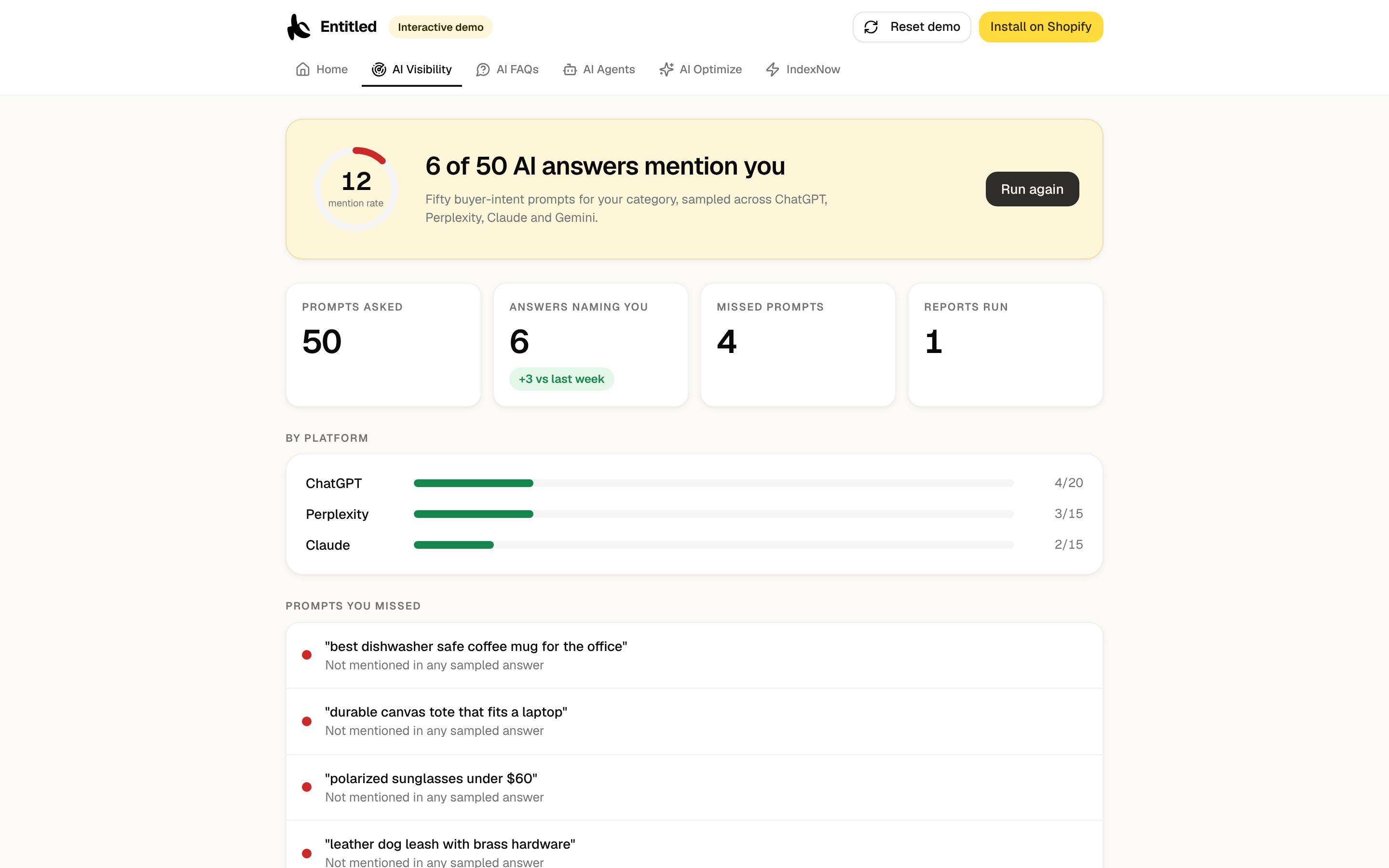
If you want the monthly re-check kept for you, the Entitled app runs a fixed prompt set weekly and keeps the named share, the per-engine split and the prompts you were missed on, so the trend is visible without a spreadsheet. It reports the same directional reading as your sheet, not a rank.
Frequently asked questions
What is an AI visibility audit?
A structured check of whether AI assistants can read your store and whether they name it. The inputs are crawler access, channel settings and product data. The outputs are sampled answers from ChatGPT, Perplexity, Claude and Gemini, the competitors they name, and the referral traffic that follows.
What is the difference between an AI visibility audit and an AI visibility checker?
A checker automates the sampling: it puts prompts to the engines and counts mentions. An audit includes that and also checks the inputs that explain the result, such as blocked crawlers, excluded products and thin product data. A checker tells you that you are missing. The audit tells you why.
Can an audit tell me my ranking in ChatGPT?
No. There is no stable ranking to report, because answers are generated, vary between runs and differ by user. The honest output is a named share across a fixed prompt set, reported with its sample size and read as a trend over several runs.
Which AI crawlers does a Shopify store need to allow?
The retrieval agents: OAI-SearchBot for ChatGPT search, PerplexityBot for Perplexity, and Claude-SearchBot and Claude-User for Claude. Google-Extended affects Gemini training and grounding in Gemini Apps, not Google Search. Training bots like GPTBot and ClaudeBot are a separate choice.
How often should I run it?
The full audit once, then again after big changes such as a theme switch or catalog import. Re-run the sampling and traffic steps monthly with the same prompts. Changing the prompt set between runs resets your baseline without telling you.
Sources
- OpenAI: overview of OpenAI crawlers
- Perplexity: Perplexity crawlers
- Anthropic: does Anthropic crawl data from the web, and how site owners can block the crawler
- Google Search Central: Google's common crawlers, including Google-Extended
- Shopify Help: editing robots.txt.liquid
- Shopify Help: agentic storefronts
- Shopify Help: managing agentic storefronts
- Shopify Help: ChatGPT and agentic storefronts
- Shopify Help: Shopify Catalog requirements
- Shopify Help: optimizing products for Shopify Catalog
- Shopify Help: product barcodes
- OpenAI: product feed specification
- OpenAI Help: temporary chat in ChatGPT
- Google Analytics release notes: the AI Assistant channel (13 May 2026)
Keep reading
Score your own catalog
Entitled grades every product against the rules on this page, explains each failure, and fixes them with AI you approve. The score is free forever.